Basic Cybersecurity Tips Everyone Should Know in 2026 (Before It’s Too Late)
Most internet users fall into a dangerous mental trap: assuming that cyberattacks only happen to multinational corporations, high-profile politicians, celebrities, or wealthy individuals.
That assumption is fundamentally wrong in 2026. Cybercriminals do not target everyday users because they are rich or famous; they target them because they are vulnerable.
An automated credential-stuffing bot testing weak passwords, an AI-generated phishing message sent to thousands of email addresses, a fake public Wi-Fi hotspot set up in a local cafe, or a malicious APK download can instantly compromise your digital identity. In today’s landscape, online threats are hyper-automated, highly personalized, and virtually indistinguishable from legitimate communications.
Cybersecurity is no longer an obscure IT topic reserved for network engineers; it is a mandatory daily life skill. You do not need an advanced degree in computer science to safeguard your digital life.
This guide breaks down the most critical online security habits, demystifies password entropy, evaluates modern authentication methods, and provides an actionable protocol to shield your accounts, phone, and financial assets from modern digital threats.
Table of Contents
- The 2026 Threat Landscape: Why Everyday Users Are Targets
- Password vs. Passphrase Entropy: The Mathematics of Security
- Side-by-Side Digital Threat & Defense Matrix
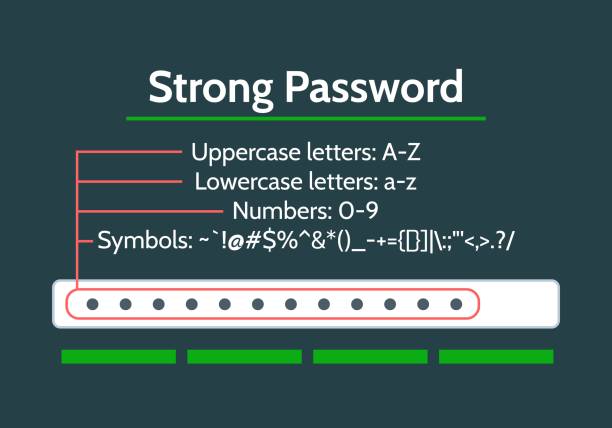
- 1. Passwords, Passphrases & Password Managers
- 2. Public Wi-Fi Risks & MitM Attack Prevention
- 3. AI-Enhanced Phishing & Social Engineering
- 4. Smartphone Hardening & Mobile Security
- 5. Patch Management & Automated System Updates
- 6. Privacy Controls & Social Media OSINT Footprint
- 7. Authentication Progression: SMS 2FA vs. Authenticator Apps vs. Passkeys
- 8. Safe Software Sourcing & Download Integrity
- 9. Data Resilience: The 3-2-1 Backup Strategy
- The 10-Step Personal Cybersecurity Protocol
- Common Cybersecurity Myths That Leave You Vulnerable
- Connecting Your Complete Tech, Security & Digital Ecosystem
The 2026 Threat Landscape: Why Everyday Users Are Targets
In past years, cyber scams were relatively easy to identify: they featured broken grammar, strange foreign formatting, and obvious financial promises.
In 2026, large language models (LLMs) and automated attack frameworks allow cybercriminals to generate hyper-realistic phishing emails, clone legitimate bank login pages down to the exact CSS styling, and harvest credentials at scale.
When an attacker breaches a minor e-commerce store or discussion forum, the leaked database containing your email address and password ends up on public breach repositories. Automated attack scripts then execute Credential Stuffing, testing that same email and password combination across hundreds of popular platforms (Gmail, online banking apps, social media, and cloud storage). If you reuse passwords, a single minor data leak gives attackers access to your entire digital footprint.
Password vs. Passphrase Entropy: The Mathematics of Security
Many users believe that adding special characters to a short password (e.g., P@ss123!) makes it uncrackable. However, modern GPU-powered cracking tools evaluate billions of short combinations per second.
Security strength is measured by Information Entropy (E), expressed in bits:

Where:
- L represents the total character length of the credential.
- R represents the size of the character pool (e.g., R = 26 for lowercase letters; R = 94 for full printable ASCII).
Because length (L) acts as a direct linear multiplier, increasing character length using memorable word combinations (a Passphrase) provides vastly higher entropy than forcing complex symbols into a short word.
| Credential Type | Example String | Character Pool (R) | Length (L) | Estimated Entropy (E) | Brute-Force Cracking Time |
|---|---|---|---|---|---|
| Weak Password | john123 | 36 (Alpha + Numbers) | 7 characters | approx 36.2 bits | Instant (Under 1 second) |
| Complex Short | P@ss2026 | 94 (Full ASCII) | 8 characters | approx 52.4 bits | A few minutes to hours |
| Long Passphrase | BlueCoffeeRain!2026 | 94 (Full ASCII) | 18 characters | approx 118.0 bits | Centuries (Computationally Infeasible) |
Side-by-Side Digital Threat & Defense Matrix
| Threat Vector | Attack Mechanism | Real-World Risk | Primary Preventive Defense |
|---|---|---|---|
| Credential Reuse | Testing breached credentials across multiple platforms. | Account takeover of email, banking, and social apps. | Dedicated Password Manager + Unique Passphrases. |
| Rogue Wi-Fi Hotspots | Setting up fake public access points with legitimate names. | Man-in-the-Middle (MitM) packet sniffing & session hijacking. | Cellular Data + VPN + Disabling Auto-Connect. |
| AI Spear Phishing | Personalized, urgent messages simulating official alerts. | Voluntary disclosure of passwords or 2FA codes. | Manual URL verification & direct portal logins. |
| Sideloaded Malware | Installing unverified third-party .apk or .exe files. | Keylogging, spyware, & financial data theft. | Official app repositories & app permission audits. |
| SIM Swapping | Tricking mobile carriers into transferring your phone number. | Interception of SMS two-factor authentication codes. | Moving from SMS 2FA to Authenticator Apps / Passkeys. |
1. Passwords, Passphrases & Password Managers
Relying on human memory to manage dozens of unique online credentials inevitably leads to password reuse.
- The Golden Rule: Never reuse the same password across multiple platforms. If an obscure online store is breached, your primary email and bank accounts remain completely secure.
- Adopt a Password Manager: Tools like Bitwarden, 1Password, or built-in secure managers (like Apple Passwords or Google Password Manager) generate, encrypt, and auto-fill unique 20-character credentials for every site you use.
- The Master Passphrase: You only need to memorize one master passphrase to unlock your password vault. Construct a passphrase using 4 or 5 random, unrelated words (e.g.,
SunflowerCoffee$Morning2026).
2. Public Wi-Fi Risks & MitM Attack Prevention
Free Wi-Fi networks in coffee shops, airports, hotels, and university campuses are inherently unencrypted and public.
- Evil Twin Access Points: Attackers can broadcast a rogue Wi-Fi signal named
Airport_Free_WiFiright next to the official airport network. Once connected, all unencrypted internet traffic flows directly through the attacker’s laptop. - Defense Rules:
- Avoid logging into financial applications or entering credit card numbers while on public Wi-Fi.
- Use your smartphone’s mobile data connection or personal hotspot for sensitive transactions.
- Turn off automatic Wi-Fi connection settings on your phone and laptop so your device does not connect to open networks without your knowledge.
- Avoid logging into financial applications or entering credit card numbers while on public Wi-Fi.
3. AI-Enhanced Phishing & Social Engineering
Phishing accounts for over 80% of reported security breaches. Modern attacks rely on psychological manipulation rather than complex code exploit scripts.
- Artificial Urgency: Messages claiming “Your bank account will be suspended within 2 hours!” or “Unusual sign-in detected, verify immediately!” are designed to bypass your logical evaluation.
- Link Masking: Hover over any hyperlink in an email before clicking. If a button says “Log In To Access Bank,” but the destination URL points to
[http://login-security-check-update.com/net](http://login-security-check-update.com/net), it is a phishing attempt. - Verification Protocol: Never click links inside unsolicited emails or SMS alerts. Open your web browser manually, type the official website address directly, or log in through the official mobile application.
4. Smartphone Hardening & Mobile Security
Your mobile phone contains your emails, photos, banking apps, location history, and personal messages, making it a primary target for attackers.
- Avoid Unverified Sideloading: Avoid downloading cracked applications or unverified
.apkpackages from random file-sharing blogs. Malicious.apkfiles can contain hidden spyware that logs keystrokes or captures screen clips. - Review App Permissions: Audit your installed applications regularly. A basic flashlight app or offline calculator app has no legitimate reason to request access to your contacts, SMS messages, or precise location data.
5. Patch Management & Automated System Updates
Delaying software update prompts on your laptop or mobile device leaves open doors for known exploits.
- The Reality of Updates: Operating system updates (Windows, macOS, Android, iOS) are rarely just about adding cosmetic features. They frequently patch critical Zero-Day Security Vulnerabilities that allow attackers to execute remote code execution scripts.
- Automate Defenses: Enable automatic operating system and app store updates across all your personal devices so security patches install overnight without interrupting your routine.
6. Privacy Controls & Social Media OSINT Footprint
Open-Source Intelligence (OSINT) refers to publicly available data that attackers gather about you from social media activity.
- Oversharing Risks: Posting photos of your boarding pass reveals full name, flight routing, and frequent flyer login details. Posting photos showing your pet’s name, childhood street, or graduation year provides direct answers to standard account security questions.
- Privacy Hardening: Set your personal Instagram, Facebook, and TikTok profiles to private mode. Limit who can view your friends list and disable location tagging on personal posts.
7. Authentication Progression: SMS 2FA vs. Authenticator Apps vs. Passkeys
Multi-Factor Authentication (MFA) adds a second verification barrier beyond your password. However, not all multi-factor methods offer equal protection:
[1. SMS Verification Codes]  --> Weakest (Vulnerable to SIM-swapping & interception)
[2. Authenticator Apps]      --> Strong (TOTP codes generated offline locally on device)
[3. FIDO2 / Passkeys]        --> Strongest (Phishing-resistant, hardware-bound cryptographic keys)
- SMS Verification (Basic): Better than using a password alone, but vulnerable to SIM-swapping attacks where scammers trick phone carriers into porting your mobile number to an attacker’s SIM card.
- Authenticator Apps (Recommended Baseline): Apps like Google Authenticator, Microsoft Authenticator, or Authy generate Time-based One-Time Passwords (TOTP) locally on your device without transmitting data over cellular networks.
- Passkeys (The Modern Standard): Passkeys replace passwords entirely using asymmetric cryptography. You confirm logins using your device’s biometric sensor (fingerprint or face recognition). Because passkeys are cryptographically bound to specific domain names, they are immune to phishing websites.
8. Safe Software Sourcing & Download Integrity
Downloading pirated creative software, cracked utility tools, or unverified browser extensions exposes your computer to persistent malware.
- Trojan Horse Malware: Free cracked software installers often bundle hidden remote access trojans (RATs), cryptocurrency miners, or cookie hijackers.
- Browser Extension Risks: Limit the number of extensions installed in Chrome, Edge, or Firefox. Malicious extensions can read and alter data across all websites you visit, capturing credit card numbers and session tokens in real time.
9. Data Resilience: The 3-2-1 Backup Strategy
Hardware failures, accidental file deletions, phone loss, or ransomware attacks can instantly wipe out your digital records. Protect your files by applying the industry-standard 3-2-1 Backup Rule:
[3 Copies of Data] --> [2 Different Physical Media Types] --> [1 Offsite / Cloud Copy]
- 3 Copies: Maintain your primary working file plus 2 backup duplicates.
- 2 Different Media Types: Store backups on two distinct storage formats (e.g., your laptop’s internal drive and an external hard drive/USB drive).
- 1 Offsite Copy: Keep at least one backup copy in a secure cloud environment (e.g., Google Drive, OneDrive, or encrypted cloud backup services) to protect against physical theft or local device damage.
The 10-Step Personal Cybersecurity Protocol
Build a resilient digital defense by implementing this sequential protocol:
- Lock Down Your Primary Email Account:
Your primary email is the master recovery key for every online account you own. Assign it a unique, 18-character passphrase and enable Authenticator App 2FA or a Passkey immediately.
2. Install a Dedicated Password Manager:
Download a verified password manager like Bitwarden or 1Password. Stop reusing passwords across platforms and let the manager store unique credentials for every site.
3. Upgrade from SMS 2FA to Authenticator Apps:
Replace SMS-based text verification for your banking, social media, and cloud accounts with an Authenticator App (e.g., Google Authenticator) to reduce SIM-swapping risk.
4. Enable System & Application Auto-Updates:
Turn on automatic updates on your phone, laptop, web browsers, and core applications to patch zero-day vulnerabilities automatically.
5. Audit Smartphone App Permissions:
Open your mobile device settings and revoke camera, microphone, contact, and precise location permissions from apps that do not require them.
6. Harden Public Wi-Fi Habits:
Stop connecting to open public Wi-Fi networks without a trusted Virtual Private Network (VPN). Use your mobile data connection for financial tasks.
7. Establish Phishing Verification Habits:
Never click login links inside unexpected emails or SMS alerts. Always type web addresses directly into your browser or use official apps.
8. Clean Up Browser Extensions & Unused Apps:
Uninstall third-party browser extensions and phone apps you no longer use. Download software exclusively from official websites and primary app stores.
9. Implement the 3-2-1 Backup Strategy:
Back up your essential documents, academic files, and photos across local external storage and cloud drives.
10. Review Social Media Privacy Settings:
Set personal social media profiles to private, limit public personal data, and avoid oversharing daily routines or location details.
Common Cybersecurity Myths That Leave You Vulnerable
Avoid these four dangerous misconceptions that compromise online safety:
- “I Have Nothing Worth Stealing:” Cybercriminals do not just target bank account balances. They hijack ordinary social accounts to run scam campaigns, use stolen identities to commit fraud, and compromise devices to join automated botnets.
- “Antivirus Software Makes Me 100% Secure:” Antivirus programs cannot protect you if you voluntarily enter your password on an AI-generated phishing website or share verification codes with a scammer.
- “Macs and iPhones Cannot Get Malware:” While iOS and macOS feature robust sandboxing, Apple devices remain vulnerable to phishing scams, compromised network connections, malicious browser extensions, and credential reuse attacks.
- “Changing Passwords Every Month Keeps Me Safe:” Forcing frequent password changes often leads users to make minor, predictable tweaks (e.g.,
Spring2026!toSummer2026!). NIST guidelines prioritize long, unique passphrases that remain unchanged unless a breach occurs.
Connecting Your Complete Tech, Security & Digital Ecosystem
Maintaining digital security relies on establishing smart online habits while keeping your hardware, productivity software, and internet connectivity optimized.
The 365Trendies Digital Hub: Operating secure software tools, password managers, and multi-tab encrypted browser sessions requires a fast computer. If your laptop is running slow, follow our step-by-step diagnostic guide on how to make your laptop faster in Nigeria without buying a new one and decode your system hardware using our explainer on laptop specs explained for real-world use.
Shopping for a secure, budget-friendly laptop or secondary device? Explore our buyer guides on the best budget laptops under ₦300k in Nigeria or follow our manual inspection protocol to properly check a UK-used laptop before buying. If you need a lightweight mobile workstation, check out the 7 best budget tablets for students and remote workers and explore our top recommendations for smartphones under ₦200k.
Prevent internet connectivity drops while performing cloud system backups by reviewing our guide on why your data finishes fast in Nigeria and how to reduce usage alongside our comparison of the best data plans for MTN, Airtel, Glo, and 9mobile. Keep your devices powered during electricity outages by applying our proven steps to fix rapid phone battery drain.
Combine digital security with real-world productivity! Organize your personal knowledge base using our head-to-head comparison of the best note-taking apps (Notion vs. OneNote vs. Obsidian), streamline your study workflow using the best free software tools for students, and supercharge your output with the best AI productivity tools tested in 2026.
Ready to build technical skills safely? Follow our step-by-step beginner coding roadmap, explore the best free coding tools for beginners, compare the best free graphic design tools (Canva vs. Figma vs. Photopea), and check out our guide on how to start graphic design in 2026. Finally, monetize your skills securely with our guide on how to start freelancing in Nigeria using your phone or laptop and explore verified options for the best apps to make money online.
Sources & Technical References
- CISA (Cybersecurity and Infrastructure Security Agency): Explore global cybersecurity standards and user awareness guidelines on the CISA Official Cyber Hygiene Hub.
- NIST (National Institute of Standards and Technology): Access digital identity guidelines and password entropy parameters at the NIST Special Publication 800-63 Digital Identity Guidelines.
- FIDO Alliance Security Framework: Review passkey authentication specifications and public-key cryptography standards via the FIDO Alliance Official Portal.