
How to Make Your Laptop Faster in Nigeria (2026): Step-by-Step Fix That Works
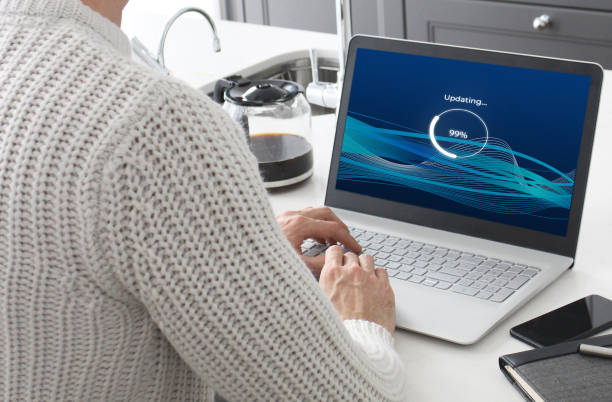
You flip open your laptop, double-click your web browser icon… and you wait. And you wait. By the time the home page finally finishes rendering, your patience is entirely exhausted and your productivity for the day has taken a massive hit.
If this scenario sounds familiar, you are dealing with a frustratingly slow laptop, a reality that thousands of students, freelancers, and remote workers across Nigeria navigate daily.
When a machine begins to lag, the immediate gut reaction is often despair: “Maybe I just need to spend money on a brand-new laptop.” But before you empty your savings account, understand this underlying truth: you can make your current laptop significantly faster without spending a single Kobo, or by executing a highly affordable hardware tweak.
This comprehensive guide breaks down the hidden bottlenecks currently choking your computer and walks you through a practical, step-by-step optimization protocol to restore its original speed.
Table of Contents
- What Is Actually Choking Your Laptop’s Speed?
- The 5-Step System Optimization Protocol
- The Hardware Game-Changers: HDD vs. SSD & RAM Upgrades
- When System Optimization Isn’t Enough: The Hardware Threshold
- Ecosystem Reality Check: Should You Switch to a Tablet or Phone?
What Is Actually Choking Your Laptop’s Speed?
A computer rarely slows down completely at random. Instead, its core components are simply being heavily overwhelmed by software background noise.
Think of your laptop’s operating system like a small, enclosed room. If you pack too many people into that room simultaneously, moving around becomes incredibly difficult, communication breaks down, and everyone slows down to a crawl. That is precisely what occurs inside your computer when:
- Too many unoptimized applications are forcing themselves to run concurrently.
- Your primary system storage drive is full of unnecessary data.
- Your operating system files are unpatched or fragmented.
Let’s dive into the step-by-step steps to clear out this digital congestion.
The 5-Step System Optimization Protocol
Do not skip any phase of this diagnostic routine. Run through these steps sequentially to extract the maximum possible processing performance from your current configuration.
1. Prune Your Startup Overload Configuration:.
One of the absolute biggest silent killers of laptop speed is a congested boot sequence. The moment you turn on your machine, a massive army of third-party programs (such as update checkers, cloud launchers, and communication software) automatically force themselves to launch. Your processor is forced to juggle multiple background tasks before it can even load your desktop, causing sluggish performance from the very beginning. The Fix: Press Ctrl + Shift + Esc to instantly open the native Windows Task Manager. Navigate to the Startup Apps tab on the left sidebar panel. Review the list, right-click on non-essential tools (like game launchers, music apps, or third-party helpers), and select Disable. You will notice a dramatic improvement in your laptop’s boot time almost immediately.
2. Clear Choked Drives & Free Up Virtual Memory:
Many users completely ignore their local drive space until the operating system throws an emergency warning banner. However, when your main system storage partition (usually the C: drive) is filled to capacity, your laptop struggles to function efficiently. This occurs because Windows requires free storage space to create temporary swap spaces called Virtual Memory or a pagefile.sys allocation when your system runs out of physical RAM. The Fix: Manually delete large, unnecessary downloads, duplicate setup configurations, and old videos. Empty your Recycle Bin regularly. Type Storage Sense into your Windows search bar and toggle it on, this utility automatically wipes background internet cache data and temporary logs. As a non-negotiable rule, always aim to keep at least 20% to 30% of your primary drive space completely free.
3. Terminate Persistent Background Resource Hogs:
Even when you aren’t actively using an application on your desktop screen, it may still be running silent background services. These rogue background applications continuously steal processing cycles from your CPU and saturate your memory capacity, dragging down your system speed. The Fix: Open your Task Manager panel and click on the Processes tab. Sort the active processes by clicking the CPU and Memory headers to see which hidden apps are eating up the largest chunk of your resources. If a background program you aren’t using is consuming significant power, highlight it and click End Task. Stop installing non-essential utility software that adds permanent background bloat.
4. Execute a Resource-Friendly Malware Scan:
Sometimes, deep sluggishness is caused by hidden, unwanted malicious software running secretly inside your directory trees. These intrusive programs, often bundled into sketchy downloads, operate behind the scenes to mine background data, run ad scripts, and aggressively drain your system performance. The Fix: Type Windows Security into your search bar, open the dashboard panel, select Virus & Threat Protection, and execute a thorough Full Scan. Avoid installing heavy, resource-draining third-party antivirus suites that end up slowing down your computer more than the actual malware. The native Windows Defender is highly optimized, lightweight, and completely free.
5. Strip Visual Effects for Integrated Graphics Relief:
Modern operating systems use fancy window animations, drop shadows, and blur transparency effects to look visually premium. However, if your budget laptop utilizes an older processor or integrated graphics, rendering these constant visual adjustments wastes processing power that should be going to your active apps. The Fix: Type Adjust the appearance and performance of Windows into your search menu and hit Enter. Under the Visual Effects tab, click the radio button that explicitly forces the system to “Adjust for best performance”. Click Apply. This instantly strips away unnecessary desktop animations, dramatically easing the processing load on your graphics hardware.
The Hardware Game-Changers: HDD vs. SSD & RAM Upgrades
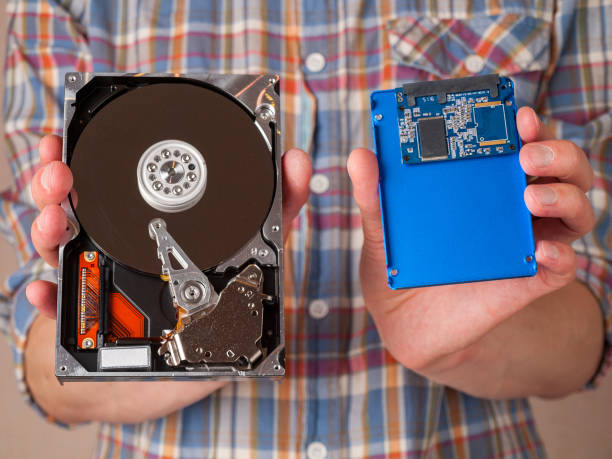
If you have completed all the software optimization tweaks above and your machine still feels sluggish, you have hit a physical hardware ceiling. Fortunately, executing a hardware upgrade is incredibly affordable and completely transforms your computing experience.
The SSD Revolution: Why HDDs are Obsolete
Traditional mechanical Hard Disk Drives (HDDs) read data using a physical moving arm that spins across magnetic platters. This mechanical process creates massive seek-time latencies. Solid State Drives (SSDs), conversely, utilize fast flash memory cells with zero moving parts, pushing exponentially higher IOPS (Input/Output Operations Per Second).
Upgrading from an old mechanical HDD to a modern solid-state drive can:
- Cut down your total Windows boot time from minutes to under 15 seconds.
- Force large development tools and heavy office programs to open instantly.
- Drastically eliminate standard interface stuttering and lag.
[Mechanical HDD] --> High physical latency, mechanical read speed, heavy battery draw[cite: 2].
[Solid State SSD] -> Zero moving parts, near-instant speed, exceptional energy savings[cite: 2].
RAM: Eradicating the Multitasking Bottleneck
If your laptop begins lagging the absolute moment you open more than three browser tabs or try to jump between an office app and an email sheet, your system is suffering from a lack of RAM. When your physical memory capacity saturates, Windows is forced to swap memory data onto your storage drive, dragging processing speeds down to a crawl.
Upgrading your system memory from a restrictive 4GB configuration to a comfortable 8GB or 16GB RAM layout gives your machine the physical breathing room it needs to juggle active application tasks concurrently without breaking a sweat.
When System Optimization Isn’t Enough: The Hardware Threshold
Let’s be completely candid: not every laptop can be saved by software optimization or part upgrades. If your current computer is:
- Exceeding a legacy lifetime of 6 to 8 years.
- Designed with a locked, non-upgradeable motherboard architecture where RAM and storage are permanently soldered in place.
- Still lagging severely after a completely fresh, clean installation of Windows and an upgrade to an SSD.
Then your processor has reached its true hardware retirement age, and it is officially time to invest in a replacement machine. If you find yourself at this crossroads, protect your wallet from overpriced retail deals by checking out our marketplace guide outlining the best budget laptops under ₦300k in Nigeria.
Ecosystem Reality Check: Should You Switch to a Tablet or Phone?
Sometimes, the root cause of your frustration isn’t that your laptop is technically bad; it is simply that a laptop might not be the right device for your specific operational habits.
- When to Transition to a Tablet: If your primary daily goals revolve around sitting comfortably to read lecture documents, reviewing PDF files, scrolling research portals, and watching long video tutorials, a dedicated tablet provides a significantly lighter, more portable screen array. Explore your options via our curated selection of the 7 best budget tablets for students in Nigeria.
- When to Rely on a High-Value Phone: If you prioritize maximum pocket portability, processing daily mobile banking receipts, responding instantly to messaging chats, and managing social media profiles on the move, a modern smartphone is your ultimate tool. Review our data matrix of the top 5 smartphones under ₦200k in Nigeria.
Pro-Tip on Performance Tracking: Don’t mistake slow, lagging internet connectivity for a broken computer. If your device flies when running offline software but lags the instant you open a web page, your mobile data connection or carrier cache background configurations are likely the problem. To learn how to stop hidden data drains and make your subscription package last significantly longer, see our guide on why your data finishes fast in Nigeria.
Sources & Technical References
- Microsoft Support Systems: Review official optimization guidelines for Windows memory structures on the Microsoft Support: Tips to Improve PC Performance in Windows Hub.
- Crucial Memory Tech Insights: Explore documentation regarding flash drive Input/Output limits and RAM page pooling on the Crucial SSD vs. HDD Performance & Architecture Learning Center.
- Kingston Technology Learning Labs: Learn more about memory swapping boundaries and structural system bottlenecks via the Kingston Technology: Benefits of Upgrading Your RAM Explainer.